
## How to use skott
## Install
You can install skott either locally or globally
```bash
npm install skott
// or
npm install skott -g
```
## **JavaScript API**
```javascript
import skott from "skott";
const { getStructure, getWorkspace, useGraph, findUnusedDependencies } = await skott({
/**
* (Optional) Entrypoint of the project. If not provided, `skott` will search for all
* supported files starting from the current working directory.
* Defaults to `""`
*/
entrypoint: "src/index.ts",
/**
* (Optional) Ignore patterns that applies during file traversal and module
* resolution. Each module matching one of the patterns will be discarded from the
* graph.
* Defaults to `[]`;
*/
ignorePatterns: ["src/examples/**/*"],
/**
* (Optional) Whether to run Skott using the incremental pattern. By setting "true",
* Skott will create a `.skott/cache.json` file to only detect and re-process what
* changed since the last analysis.
* Defaults to `true`;
*/
incremental: true,
/**
* (Optional) restricts file discovering when building the graph.
* Defaults to `[".js", ".mjs", ".cjs", ".jsx", ".ts", ".tsx"]`
*/
fileExtensions: [".ts", ".tsx"],
/**
* (Optional) Max depth search for circular dependencies. This can be useful for
* performance purposes.
* Defaults to `POSITIVE_INFINITY`.
*/
circularMaxDepth: 20,
/**
* (Optional) Sets the base directory to start the analysis from. It's useful
* when you want to run skott from a parent directory targetting a specific sub
* directory (in the context of monorepo for instance). Using `cwd=some-path`
* is equivalent to `cd some-path && skott`.
* Defaults to `process.cwd()`.
*/
cwd: "./",
/**
* (Optional) Whether the base directory of the entrypoint should be included in relative
* file paths. For the specified `src/index.ts` above, it would consider the
* root path to be `./` consequently `src/` would never appear in any file paths.
* Note: `includeBaseDir` can only be set to "true" when there is an `entrypoint`
* provided.
* Defaults to `false`.
*/
includeBaseDir: false,
/**
* (Optional) Whether third-party dependencies (npm) and/or builtin (Node.js core modules)
* should be added in the graph and/or TypeScript type-only import should be followed.
* Defaults to `thirdParty=false`, `builtin=false`, and `typeOnly=true`.
*/
dependencyTracking: {
thirdParty: true,
builtin: true,
typeOnly: true
},
/**
* (Optional) Provide a custom tsconfig file to help skott resolve path aliases.
* When extending some other tsconfig files, skott will be able to parse
* all the way up all the path aliases referenced.
* Defaults to `tsconfig.json`.
*/
tsConfigPath: "./tsconfig.json",
/**
* (Optional) Provide a path to the package.json that should be used to detect
* unused third-party dependencies.
* Defaults to `package.json`.
*/
manifestPath: "./package.json",
/**
* (Optional) Provide custom dependency resolvers to take full control over the
* content that will be added to the graph nodes.
* Defaults to `EcmaScriptModuleResolver` which is used a standard dependency
* resolver for ECMAScript projects.
*/
dependencyResolvers: [new RushResolver()],
/**
* (Optional) Enable verbose internal logging.
* Defaults to `false`
*/
verbose: true,
/**
*
* (Optional) If this function is provided, Skott will build a separate graph of links
* between entire groups of modules, which can be later accessed as `groupedGraph` in the
* result of `getStructure` call.
*
*/
groupBy: (path) => {
if (path.includes("core")) return "core";
if (path.includes("feature-a")) return "feature-a";
return undefined;
};
});
```
> [!NOTE]
> Starting from 0.34.0, skott visualization modes can be programatically registered using the API through the `rendering module` accessible through (`"skott/rendering"`) export. It allows all options to be provided (some options aren't accessible through the CLI) while having the ability to visualize the result of the API. An **[example of the rendering module can be found there](https://github.com/antoine-coulon/skott/blob/main/packages/skott/examples/api-rendering.ts)**.
More API **[examples can be found there](https://github.com/antoine-coulon/skott/blob/main/packages/skott/examples/api.ts)**.
## **Command line interface**
skott exposes a CLI directly using features from the core library. All the options shown from the API can be used from the CLI, please use `skott --help` to see how to express them via the command line.
> [!NOTE]
> All skott's runtime configuration options might not be available through the CLI, especially options that expect non serializable values such as functions (`groupBy` option for instance) as skott does not support any runtime configuration file (such as `.skottrc`). However, skott provides everything through its API, including capabilities to programmatically render all the available display modes, more [can be found there](https://github.com/antoine-coulon/skott/blob/main/packages/skott/examples/api-rendering.ts).
When the library installed locally you can run:
**Providing an entrypoint:**
```bash
$ ./node_modules/.bin/skott src/index.js
```
When the library is installed globally:
```bash
$ skott src/index.js
```
**Note: The CLI output might be massive, so don't hesitate to pipe the stdout into a file:**
```bash
$ skott --displayMode=file-tree > skott.txt
```
**Run a global analysis from the current working directory:**
Using this command, skott will deeply search for all ".ts" and ".tsx" files starting from cwd
```bash
$ skott --fileExtensions=.ts,.tsx
```
**Finding unused files and dependencies:**
```bash
$ skott --showUnusedFiles --showUnusedDependencies --trackThirdPartyDependencies
```
An important description of that feature is available below in the API section.
**skott** offers many ways to visualize the generated graph.
**Embedded Web Application**
skott embeds a _display mode_ **"skott --displayMode=webapp"** allowing you to visualize more precisely dependencies and the links between them. Here is an overview of what you can do:
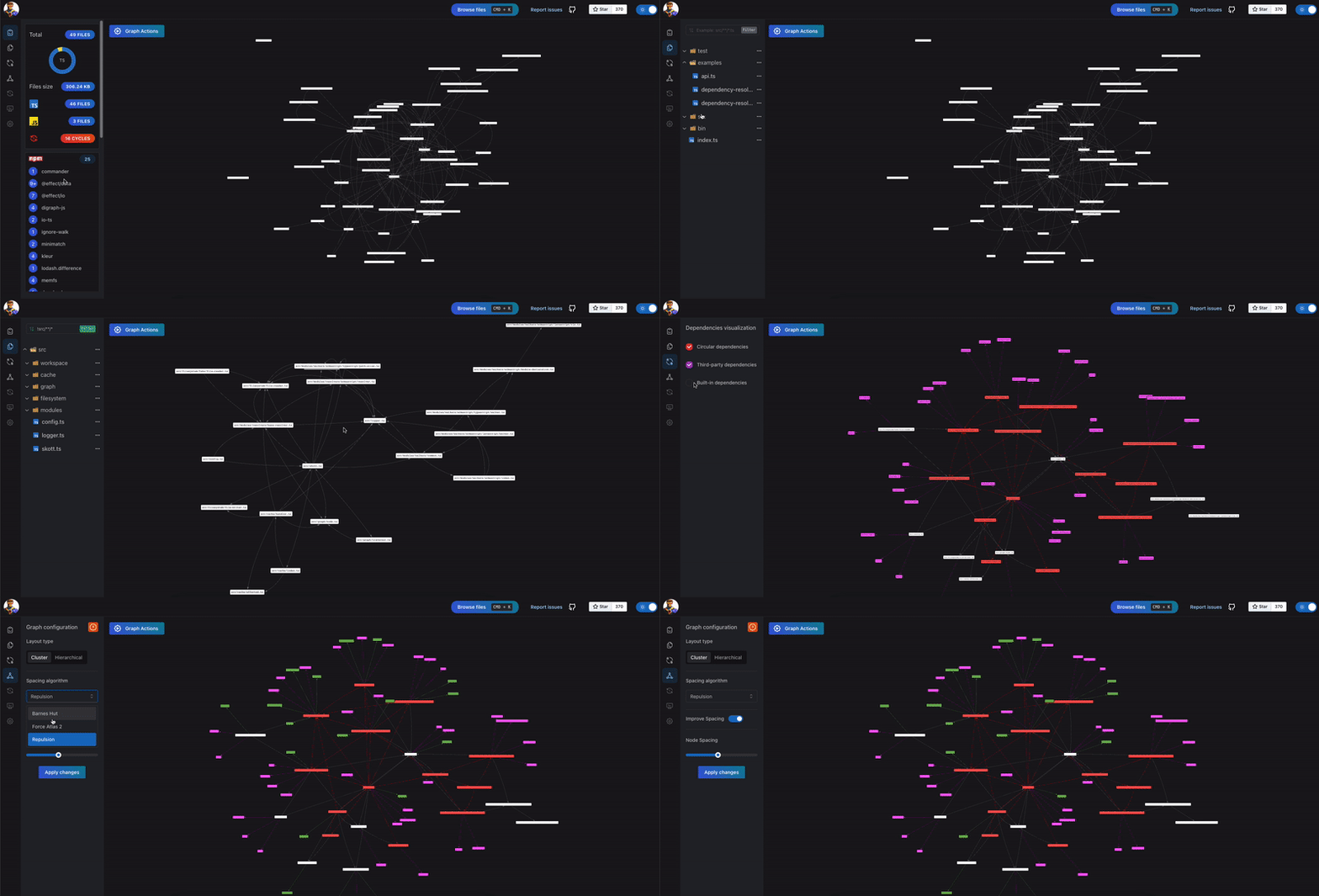 As shown above **Third-party** and **Built-in dependencies** can be toggled when they are tracked (by providing `--trackThirdPartyDependencies` and `--trackBuiltinDependencies` to the CLI).
When `Circular dependencies` are found in the graph, they can also be toggled via the _Node visualization options_ as shown below:
As shown above **Third-party** and **Built-in dependencies** can be toggled when they are tracked (by providing `--trackThirdPartyDependencies` and `--trackBuiltinDependencies` to the CLI).
When `Circular dependencies` are found in the graph, they can also be toggled via the _Node visualization options_ as shown below:
 **skott** also offers other visualization modes, for instance static files (.svg, .png, .md, .json).
**Note: this static file generator is provided via a skott plugin `@skottorg/static-file-plugin` that needs to be installed.** So before using `svg/png/md/json` be sure to install the appropriate `@skottorg/static-file-plugin` plugin. Using the Node resolution algorithm, skott will be able to find the plugin on its own, no need to define it anywhere.
```bash
$ npm install @skottorg/static-file-plugin
$ skott src/index.js --displayMode=svg
```
For **skott** itself, the following _.svg_ file is generated:
**skott** also offers other visualization modes, for instance static files (.svg, .png, .md, .json).
**Note: this static file generator is provided via a skott plugin `@skottorg/static-file-plugin` that needs to be installed.** So before using `svg/png/md/json` be sure to install the appropriate `@skottorg/static-file-plugin` plugin. Using the Node resolution algorithm, skott will be able to find the plugin on its own, no need to define it anywhere.
```bash
$ npm install @skottorg/static-file-plugin
$ skott src/index.js --displayMode=svg
```
For **skott** itself, the following _.svg_ file is generated:

On the CLI side, here are some examples of output generated:
Example targetting [Fastify](https://www.fastify.io/) using **"graph"** display mode:

Using **"file-tree"** display mode:

When asking for circular dependencies to be found (using the `--showCircularDependencies` option):

See all the options of the CLI running:
```bash
$ skott --help
```
## More about the JavaScript API
To initialize the dependency graph, the default exported function must be used first.
Once executed, the default function returns a set of functions to retrieve some
information about the graph just built.
```javascript
import skott from "skott";
const { getStructure } = await skott({
entrypoint: "index.js",
// ...rest of the config
});
const { graph, files } = getStructure();
console.log(graph); // logs { "index.js": { id: "index.js", adjacentTo: [], body: {...} } };
console.log(files); // logs [ "index.js" ]
```
### Graph API
To easily consume the graph that was emitted while exploring the project, skott exposes a graph API including various methods to traverse all the nodes, collect parent and children dependencies, find circular dependencies, and more.
```javascript
import skott from "skott";
const { useGraph } = await skott();
const {
getFileNode,
traverseFiles,
collectFilesDependencies,
collectFilesDependingOn,
collectUnusedFiles,
findLeaves,
findCircularDependencies,
hasCircularDependencies
} = useGraph();
```
### Graph walking
```javascript
const { useGraph } = await skott();
const { traverseFiles } = useGraph();
const unusedFiles = collectUnusedFiles();
// Starting from any node, walking the whole graph
for(const file of traverseFiles()) {
// SkottNode { }
}
// Starting from a specifc node, walking the graph from it
for(const file of traverseFiles({ rootFile: "index.js" })) {
// SkottNode { }
}
// By default, skott will collect "shallow first" files in a Breadth-First fashion
// meaning the iterator will first emit direct module imports for each visited node.
// If the traversal needs to be "deep first" instead i.e. you first want to go deep
// down through the graph until meeting a leaf you might want to use "deepFirst" option
// to turn the traversal into Depth-First search.
for(const file of traverseFiles({ rootFile: "index.js", traversal: "deepFirst" })) {
// SkottNode { }
}
```
### Search for circular dependencies
```javascript
import skott from "skott";
const { useGraph } = await skott({
entrypoint: "index.js",
});
const { findCircularDependencies, hasCircularDependencies} = useGraph();
// Imagine that starting from "index.js" skott detects a circular dependency
// between "core.js" and "utils.js" files
console.log(findCircularDependencies()); // logs [ [ "core.js", "utils.js" ] ]
console.log(hasCircularDependencies()); // logs "true"
```
### Search for leaves (nodes with no children)
leaf.js
```javascript
console.log("I'm a leaf because I have no dependency");
```
index.js
```javascript
import skott from "skott";
const { useGraph } = await skott({
entrypoint: "leaf.js",
});
const { findLeaves } = useGraph();
console.log(findLeaves()); // logs [ "leaf.js" ]
```
### Deeply or Shallowly search for parent or children dependencies of a given node
children.js
```javascript
export const childrenFunction = () => {};
```
parent.js
```javascript
import { childrenFunction } from "./children.js";
childrenFunction();
```
index.js
```javascript
import skott from "skott";
import { CollectLevel } from "skott/graph/traversal";
const { useGraph } = await skott({
entrypoint: "parent.js",
});
const { collectFilesDependingOn, collectFilesDependencies } = useGraph();
// CollectLevel.Deep or CollectLevel.Shallow. In that case just one level so we can use Shallow
console.log(collectFilesDependingOn("children.js", CollectLevel.Shallow));
// logs [ SkottNode { id: "parent.js" } ]
console.log(collectFilesDependencies("parent.js", CollectLevel.Shallow));
// logs [ SkottNode { id: "children.js" } ]
```
### Find unused files
skott provides a way to collect **unused** files. Files are marked as "unused" from a pure source code analysis standpoint, meaning that a given file is considered unused only if it is not importing any other file and there is no other file importing it. In the graph lingo, we refer to these nodes as **isolated nodes**.
Note: having a file being marked as unused does not necessarily mean that this file is useless, but rather than skott didn't find any use of it when traversing the whole project graph. Sometimes files are being exported as a npm library entrypoint even though they are not used in the internals of that library (for instance `package.json#exports`), or sometimes files are being used by other tools being run from npm scripts or whatever else toolchain.
Unlike `unused dependencies` shown below, `unused files` don't need further analysis or need additional context e.g. a manifest file (package.json for Node.js) to be determined. This is why they belong in the Graph API, as `unused files` are nothing but `isolated nodes` in the context of skott.
```javascript
import skott from "skott";
const { useGraph } = await skott();
const unusedFiles = useGraph().collectUnusedFiles();
// [ "index.js", "some-other-file.ts", "else.js" ]
```
### Find unused dependencies
skott provides a way to walk through dependencies listed in the current working directory manifest (package.json) and compare them to what it founds and marked as "used" during the analysis. The "use" marking will be done when a third-party module appears to be imported in the source code that was walked. All the third-party dependencies that are not used in the traversed files will be returned as "unused".
Additionnally to the source code analysis, skott integrates with [depcheck](https://github.com/depcheck/depcheck) allowing it to take a peak at "implicit" dependencies and emit hypothesis about whether some `devDependencies` are unused or not, by walking through most common config files.
Note: finding precisely implicit dependencies is hard so please double check dependencies part of the `devDependencies` that are marked as "unused" by the analysis. If some `dependencies` (production deps) appear to be unused but are indeed used somewhere in the codebase, it could mean two things:
- the input files pattern you provided to skott don't cover the parts of the graph where the dependency is used
- the dependency is used nowhere through the source code files walked, meaning that it should probably be moved to `devDependencies` or just get removed.
In any case, `unused dependencies` just raise an alert so I would advise to double check before getting rid of a dependency.
```javascript
import skott from "skott";
const { findUnusedDependencies } = await skott();
const { thirdParty } = await findUnusedDependencies();
// [ lodash, rxjs, typescript ]
```
### Explore file node metadata
Take for instance `lib.js` with the following content:
lib.js
```javascript
import * as fs from "node:fs";
import { parseScript } from "meriyah";
```
And given the entrypoint `main.js` module below:
main.js
```javascript
import skott from "skott";
const { getStructure } = await skott({
entrypoint: "lib.js",
dependencyTracking: {
builtin: true,
thirdParty: true,
typeOnly: true
}
});
const { graph } = getStructure();
console.log(graph["lib.js"].body);
// Prints
{
size: 70,
thirdPartyDependencies: ["meriyah"],
builtinDependencies: ["node:fs"]
}
```
### Explore your architecture
Skott allows you to explore the relationships between parts of your architecture, not just between specific modules.
To do that you need to tell Skott, how exactly modules in your project are combined into a architecture blocks - use `groupBy` API for that:
```typescript
const instance = await skott({
groupBy: (path) => {
if (path.includes("src/core")) return "core";
if (path.includes("src/feature-a")) return "feature-a";
// ... other conditions
// if no match
return undefined;
}
});
const { groupedGraph } = instance.getStructure();
groupedGraph["core"];
// { id: "core", adjacentTo: [], body: { size, files, ... } }
groupedGraph["feature-a"];
// { id: "feature-a", adjacentTo: ["core", ...], body: { size, files, ... } }
```
### Explore workspace content
Let's suppose we're currently using pnpm workspaces and we have the following workspace:
```
/apps/my-app/package.json
/libs/my-lib/package.json
```
Skott allows you to traverse the workspace and collect all manifest files with their own dependencies.
main.js
```javascript
import skott from "skott";
const { getWorkspace } = await skott();
console.log(getWorkspace());
// Prints
{
"my-app": {
dependencies: {
//
},
devDependencies: {
//
},
peerDependencies: {
//
}
},
"my-lib": {
dependencies: {
//
},
devDependencies: {
//
},
peerDependencies: {
//
}
}
}
```
This feature could help creating a dependency graph only using manifests instead of parsing and traversing the whole source code graph using static analysis.
### Explore all the information through the Rendering module
skott's API can be used to have a programmatic access to the project's graph and
all the information collected through the project analysis.
However when it comes to visualizing that information, skott provides many display
modes that were mostly accessible through the CLI only.
Since 0.34.0, skott provides a way to render these display modes while being
in the API context, allowing to have a better control over the configuration,
if it's depending on any other context (environment, output of other functions, etc).
**Terminal application rendering**
```js
import skott, { defaultConfig } from "skott";
import { Web, Terminal } from "skott/rendering";
await Terminal.renderTerminalApplication(defaultConfig, {
displayMode: "graph",
exitCodeOnCircularDependencies: 1,
showCircularDependencies: true,
showUnusedDependencies: true,
watch: true
});
```
**Web application rendering**
When it comes to web application, two options are available:
1. using `renderWebApplication` that just requires the runtime configuration, and
manages the lifecycle of skott internally.
```js
await Web.renderWebApplication(
// skott runtime config
defaultConfig,
// application config
{
visualization: {
granularity: "module"
},
watch: true,
port: 1111,
onListen: (port) => console.log(`Listening on port ${port}`),
open: true,
onOpenError: () => console.log(`Error when opening the browser`)
}
);
```
2. using `renderStandaloneWebApplication` that takes a factory function that
provides the skott instance, allowing to have a better control over
what is injected into the skott instance. That can become especially handy
when using plugins for external tools that need to alter the structure of the
graph before rendering it. As there is no plugin system in skott (yet), this
is a way to achieve a similar result. This is what we're using to build the
[Rush](https//rushjs.io) monorepo tool [skott plugin](https://github.com/antoine-coulon/krush).
```js
// In that case it's just using skott, but could be anything mapping the graph
// to a different structure, as long as it respects the expected contract.
const factory = () => skott(defaultConfig);
await Web.renderStandaloneWebApplication(
// factory function
factory,
// application config
{
visualization: {
granularity: "module"
},
watch: {
cwd: process.cwd(),
ignorePatterns: ["tests/**/*"],
fileExtensions: [".ts"],
verbose: true
},
port: 1111,
onListen: (port) => console.log(`Listening on port ${port}`),
open: true,
onOpenError: () => console.log(`Error when opening the browser`)
}
);
```
## Contributors


